
ClockShark Time Tracking
Clockshark LLCBusiness
3.539.00 Reviews
- Version
- 2.18.1
- Installs
- 50.00K
- Age Rating
- Everyone
Screenshots
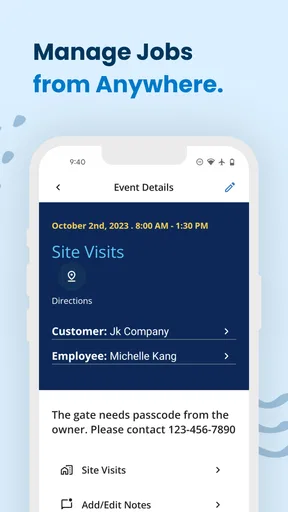
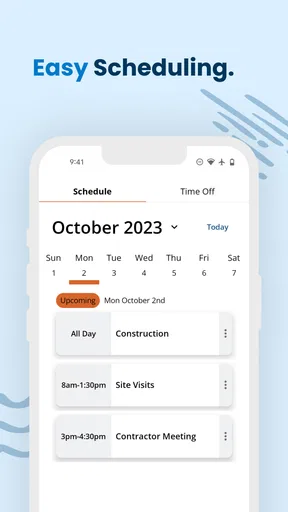

Our Review of ClockShark Time Tracking
 Analysis by Appyee
I tested ClockShark Time Tracking as a work-focused timekeeping app, and my first impression is that it makes the most sense when several people need a clear record of hours connected to jobs. It is free, aimed at business use, and developed by Clockshark LLC. The idea is straightforward: replace scattered notes, memory, and end-of-week reconstruction with a more consistent routine for clocking in, clocking out, and keeping work organized.
That simplicity is also the key to understanding it. This is not an all-purpose household organizer, a family calendar, or a personal stopwatch dressed up as a business tool. I found it more useful when I treated it as a shared work system with separate responsibilities. One person may need to record time, another may need to review it, and everyone benefits only if the boundaries between those roles remain clear.
How ClockShark fits a shared workday
A realistic example would be a household where two adults handle jobs for different customers, or where one person manages a small service business and another occasionally helps with field work. Instead of leaving a paper note on the kitchen counter, each worker can use their own account and record the beginning and end of their shift. The manager can then have a more dependable view of which job received the time.
I would not recommend passing one logged-in phone around between family members. That creates confusion about whose hours are being recorded and makes corrections harder to understand later. A shared device can still be practical in a pinch, especially when a work phone is kept in a vehicle or workshop, but the person using it needs to confirm the active account and job before saving anything. That small habit prevents a surprisingly common problem: accurate time attached to the wrong worker or task.
The app’s value grows when the workday has several stops. Imagine leaving home for a repair appointment, moving to a second customer, and finishing paperwork later. A reliable clock-in and clock-out routine gives the business something better than a vague memory of the day. It can also make conversations about hours less personal, because the discussion starts with a recorded work history rather than competing recollections.
For a household using it together, I see three sensible arrangements. The first is individual use, where each worker manages their own time. The second is a manager-and-worker arrangement, where one person is responsible for organizing jobs and another mainly records hours. The third is occasional shared-device use, where the phone is communal but the accounts remain separate. The important point is that the device may be shared, but the work identity should not be.
Starting with clean account boundaries
Setup is easiest when I decide in advance who will use the app, what each person is responsible for, and which jobs need to be distinguished. I would create or confirm the relevant account before the first busy workday, then agree on a simple rule: clock in when work actually begins, select the correct job, and clock out when that work period ends. A short routine is more dependable than asking people to remember several exceptions.
Those boundaries matter even more in a family business. A spouse, sibling, or teenager helping with a task may be trusted personally, but trust does not remove the need for separate records. Mixing household errands with paid work can make a report difficult to interpret. If someone stops for groceries during a work route, for example, the household may understand the interruption, but the business still needs a consistent decision about when work time pauses.
I also recommend keeping personal use separate from business use. ClockShark is categorized as a Business app, and that focus is helpful when the goal is job-related time. It is less suitable as a general timer for studying, cooking, exercise, or informal chores. Using one tool for everything can make the history noisy, while using it only for work keeps the records easier to review.
The app is free, which removes an obvious barrier for a small team testing a new routine. Still, “free” does not eliminate the cost of adoption. Someone has to explain the process, check whether entries make sense, and correct mistakes when people forget to clock out or choose the wrong job. I would allow time for that human oversight rather than assuming installation alone will solve timekeeping.
Its listed minimum operating system is 11, so device compatibility should be checked before asking every worker to depend on it. That is particularly relevant in a household where one person may use a newer phone and another relies on an older spare handset. A shared workflow is only useful if every required device can run it consistently.
Coordinating jobs without creating more work
My strongest practical recommendation is to define the job names before the team starts using the app seriously. If one person writes “Smith,” another writes “Smith house,” and a third chooses “repair,” the records may all refer to the same visit but will not be easy to compare. Clear naming is a small administrative decision that has a large effect on later review.
For a manager, the useful workflow is not simply checking whether someone was active. It is comparing the recorded time with the job that needed it. If a routine appointment repeatedly takes longer than expected, the history can prompt a better conversation about travel, preparation, or the scope of the work. I would use the app as a starting point for those conversations, not as a substitute for understanding what happened on site.
For workers, the main advantage is that the record is made close to the event. Waiting until Friday encourages guesswork, especially when several jobs look similar. I found the habit of recording the transition between jobs more valuable than trying to reconstruct the entire day from memory. The trade-off is that the worker must remember to interact with the app at the right moments, so the system depends on routine and attention.
Household coordination can be improved with a short daily check rather than constant monitoring. A manager might review whether everyone has a beginning and ending entry before preparing payroll or customer paperwork. That is less disruptive than repeatedly asking where someone is or whether they remembered a task. It also keeps the app in its proper role: a coordination aid, not a replacement for ordinary communication.
One non-obvious benefit is that separate records can reduce family tension. When relatives work together, disagreements about time can feel personal. A shared process gives everyone the same expectation, even if the entries still need correction. The limitation is equally important: a time record cannot explain quality, delays, customer changes, or unpaid preparation by itself. I would never treat a number in the app as the complete story of a workday.
What shared devices can and cannot solve
A communal phone may seem convenient for a small operation, but it introduces account risk. If the device remains signed in to one worker, the next person may record time under the wrong identity without noticing. If people repeatedly sign out and back in, the process becomes slow and may encourage shortcuts. My preference is for each worker to use their own compatible device whenever possible, with a shared phone reserved for clearly controlled situations.
If a household must share a device, I would place a visible reminder near it stating whose account is currently active and what job is being recorded. That is not an app feature; it is a practical safeguard around the app. I would also make the final user verify the entry before putting the phone away. A ten-second check is easier than untangling several incorrect records later.
Shared use also raises a privacy question inside the household. A worker may be comfortable recording business time without wanting every family member to browse their work history. The solution is to agree on access before deployment. The app should not be treated as a communal diary simply because the phone is communal. People need to know who reviews work records and why.
This is where ClockShark differs from a basic stopwatch. A stopwatch is usually personal and immediate: start it, stop it, and read the duration. ClockShark is more useful when time belongs to jobs and must remain understandable after the day ends. On the other hand, a stopwatch may be better for a solo worker who only wants a quick duration and does not need job organization or shared accountability.
It also differs from a household calendar. A calendar helps people remember appointments and coordinate availability, but it does not replace a dedicated clock-in and clock-out habit. I would use a calendar to see where the family needs to be and ClockShark to keep the work record. Trying to force either tool to perform the other’s job creates unnecessary confusion.
Age, trust, and responsible use
The content rating is Everyone, but that should not be confused with being designed for children. The app is a business tool, and the sensible question is whether a person understands the work routine and the responsibility attached to recording time. A young helper might be able to use it in a supervised family business, but I would establish clear expectations before giving them responsibility for entries.
For adults, trust still works best when it is supported by transparent rules. Everyone should know when to clock in, what counts as a job change, and how to report a mistake. If one person is allowed to edit or review records while others are not, that distinction should be explained openly. Hidden expectations are especially damaging in family arrangements because an ordinary correction can look like favoritism.
I would also avoid using the app as a way to watch relatives outside work. Its purpose in this context is to organize business time, not to turn a household into a surveillance system. A healthy arrangement limits review to the information needed for scheduling, payroll preparation, customer records, or internal planning. That boundary protects both trust and the usefulness of the records.
The age rating makes the app broadly accessible from a content perspective, while the minimum operating system requirement still affects which phones can participate. Before involving a teenager or older relative, I would test the exact device and make sure the person can follow the account and job-selection routine without assistance. Accessibility is not only about whether the app opens; it is also about whether the workflow is understandable under real working conditions.
There is another trust issue that is easy to miss: a recorded shift can look precise even when the underlying routine was careless. Someone may forget to end a session, select the wrong job, or share a phone without changing accounts. I would teach users to report errors promptly instead of quietly trying to make the record appear perfect. Honest corrections are more useful than false precision.
Where this app is a strong fit
I think ClockShark is a good candidate for small service teams, family-run businesses, and workers who move between clearly defined jobs. It is especially appealing when paper timesheets have become unreliable but a full enterprise system would feel excessive. A small group can start with a simple process, learn where mistakes occur, and improve its job naming and review habits over time.
It can also help a manager who is tired of receiving several different versions of the same workday. A common app gives the team one place to begin the conversation. That does not guarantee perfect records, but it reduces the number of formats and memory-based explanations that have to be reconciled.
I would be more cautious if your main need is project planning, invoicing, detailed customer relationship management, or household scheduling. ClockShark may sit alongside those tools, but I would not choose it expecting one app to cover every administrative task. Likewise, a person who works alone on one repeating activity may find a simpler timer less demanding.
The public response appears mixed rather than universally enthusiastic, with an average of 3.5 from around 95 ratings and 39 written reviews. I read that as a reason to test the workflow with a small group before making it central to a business. The app has passed the threshold of practical interest, with over 50 thousand installs, but adoption numbers do not prove that it will suit every team’s habits.
Its current version is 2.18.1, and the app was released on November 29, 2023. Those details are useful when checking whether a device and an existing business process are aligned, but I would still judge it by a short real-world trial: have two people use separate accounts, assign a few clearly named jobs, and review the resulting entries after several workdays.
My household verdict after using it as a work tool
My opinion is favorable when the app is given a narrow, well-defined job. It can bring order to work hours, make job-based coordination easier, and reduce the need to reconstruct a day from scraps of paper or memory. The best results come from separate accounts, clear job names, a shared rule for clocking in and out, and a manager who reviews records without treating them as unquestionable truth.
I would not install it simply because a family shares a phone or wants a general-purpose organizer. The shared-device scenario needs extra care, and the app does not remove the need for communication about privacy, corrections, or responsibilities. If those boundaries are uncomfortable, a simpler personal timer or a separate scheduling tool may be a better fit.
For a small household business, however, the free price and business focus make it worth trying. Start with one work process instead of moving everything at once. Give each worker a distinct identity, keep personal activities outside the work record, and inspect the first entries together. The real strength is not merely recording hours; it is creating a common, understandable routine around them.
ClockShark Time Tracking is therefore best for people who want practical job-based timekeeping without turning the household into a complicated software project. I would recommend it to a small team willing to establish clear habits, while advising solo users with very simple needs and families seeking child-focused coordination to look elsewhere. Used within its proper boundaries, it is a useful business companion rather than an all-purpose household app.
Verdict
Strengths of ClockShark Time Tracking
- GPS tracking helps verify job-site arrival and departure times.
- Mobile clock-in options suit employees working across multiple locations.
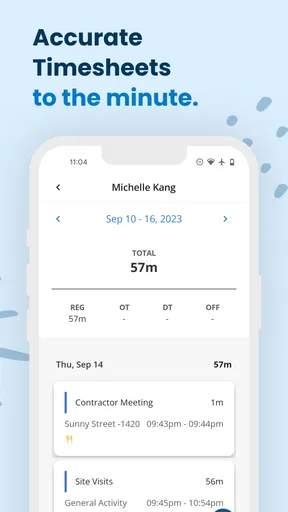
- Timesheets can be reviewed and approved before payroll processing.
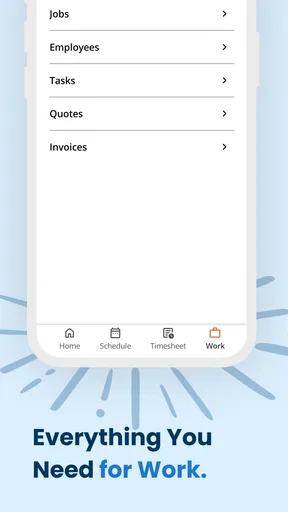
- Useful job and task organization for teams managing several projects.
- Supports employee accountability without requiring paper timesheets.
Limitations of ClockShark Time Tracking
- Some advanced features may require a higher-priced subscription plan.
- Employees may have privacy concerns with location tracking enabled.
- Setup can take time when configuring users, jobs, and payroll rules.
- The app depends on a stable internet connection for smooth synchronization.
- Small businesses may find the full feature set more than they need.
Similar Picks in This Category
View All
LinkedIn: Community & Network
LinkedIn3.8

Zoom Workplace
zoom.com4.1

Microsoft Teams
Microsoft Corporation4.6

Meta Business Suite
Meta Platforms, Inc.4.6

Webex Meetings
Cisco Systems, Inc.4.5

TeamViewer Remote Control
TeamViewer4.4
Frequently Asked Questions
What is ClockShark Time Tracking used for?
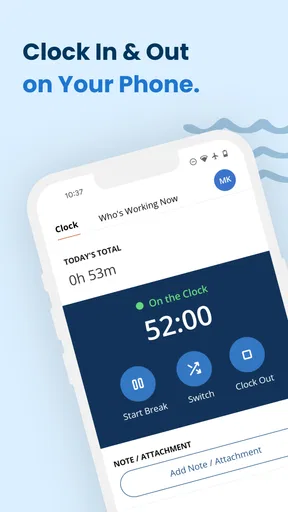
ClockShark is a time-tracking and workforce-management app designed mainly for field service companies, contractors, and mobile teams. After setting up employees, jobs, and schedules, managers can track work hours, review timesheets, monitor job activity, and organize payroll information. Employees can clock in and out from their phones, making it useful when staff members work away from a traditional office.
How do employees clock in and out with ClockShark?
Employees generally use the mobile app to start and end their shifts, select the appropriate job or task, and record breaks when required. Depending on the company’s configuration, ClockShark may also use GPS or location-based features to help verify where clock-ins and clock-outs occur. The exact options available can vary according to the administrator’s settings, subscription plan, device permissions, and local workplace policies.
Does ClockShark track an employee’s location all the time?
ClockShark includes location-related tools, but continuous tracking is not necessarily enabled in every account or for every employee. Businesses can configure features such as GPS verification, location reminders, or job-site visibility according to their needs. Before using the app, employees should review the permissions requested by the app and their employer’s tracking policy, since location behavior may differ between companies and account configurations.
Can ClockShark help with payroll and timesheet management?
ClockShark is built to make recorded work hours easier to review and prepare for payroll. Managers can check timesheets, identify missing punches or unusual entries, approve hours, and organize time by employee, project, or job. It may also connect with supported payroll or accounting services, although available integrations and export options can depend on the company’s plan. Users should confirm compatibility before subscribing.
Is ClockShark free to download and use?
The ClockShark app may be available to download without an upfront charge, but access to its complete time-tracking and management features typically depends on an employer account, trial period, or paid subscription. Employees usually do not choose the plan independently because the company administrator manages billing and permissions. Pricing, trial availability, supported features, and account requirements can change, so check the official listing or ClockShark website before downloading.
